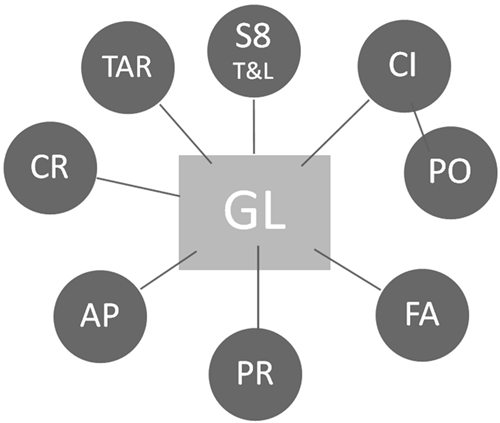
The WinTen² suite of programs is designed to work together seamlessly, providing a platform for you to effectively manage your housing, maintenance and accounting activities. At the center of the suite, the General Ledger (GL) receives posted transactions from other programs and allows you to report on the state of your housing authority. Because these programs are so closely integrated, they must be set up to communicate with each other, especially the General Ledger. This topic will guide you through the process of setting up the programs that posts to the General Ledger.
There are other aspects of the WinTen² programs that must be configured to allow their proper use for your business functions. This topic, however, focuses only on elements of the eight programs that direct correct posting to the General Ledger.
The eight programs that post transactions to,or use accounts numbers from, the General Ledger in their operation are Tenant Accounts Receivable (TAR), Section 8 Tenant & Landlord (S8 T&L), Consumable Inventory (CI), *Purchase Orders (PO), Fixed Assets (FA), Payroll (PR), Accounts Payable (AP) and Check Reconciliation (CR).
*Note: The Purchase Orders program does not post directly to General Ledger, however when Consumable Inventory items are received in PO, it updates CI and CI then posts to the General Ledger.
Note: The Master Setup program is also required for General Ledger to function. The Master Setup program allows the administrator of your WinTen² programs to control various high-level settings that affect how the programs interact with each other. Another important function of Master Setup is to control security permissions, which govern what any individual can see or do in the programs.
Accounts Payable
As you purchase items to restock your inventory, you will issue each purchase order to a specific vendor. You can also choose to assign preferred vendors to your inventory items, which helps speed this process. You can maintain your agency’s list of approved vendors from Accounts Payable or Purchase Order.
Check Reconciliation
When you make manual entries in Bank Reconciliation’s check register (e.g., entries for hand-entered deposits and handwritten checks, as opposed to checks written in other WinTen² programs), they appear in General Ledger’s Check Reconciliation Journal.
Consumable Inventory
Inventory adjustments from Consumable Inventory appear as automatic journal entries in General Ledger’s Consumable Inventory Journal.
Fixed Assets
Depreciation transactions and inventory adjustments from Fixed Assets appear in General Ledger’s Fixed Assets Journal.
Payroll
General Ledger’s Payroll Journal receives transactions from Payroll at the end of each payroll check run.
Purchase Order
You can use either Consumable Inventory or Purchase Order to issue the purchase orders needed to restock your inventory. As vendors deliver items, you will record them as received in Purchase Order, at which time Consumable Inventory automatically updates the inventory quantities of those items.
Section 8 Tenant and Landlord
All checks you write in Section 8 Tenant and Landlord appear in General Ledger’s Section 8 Journal.
Tenant Accounts Receivable
Charges your tenants accrue and payments they make to your agency appear in General Ledger’s Receivables Journal.
Copyright © Tenmast Software 2011